Demo Mode
Demo mode starts Herald with synthetic data. Try a fake inbox and demo calendar first. No mailbox, calendar account, Ollama, or API key required.
make build./bin/herald --demoDemo mode is useful for trying the interface, recording demos, and testing
visual changes without touching real accounts. It skips real IMAP, SMTP, and
calendar setup. Demo AI features are deterministic and run offline, so
classification, semantic search, chat, quick replies, and Herald Memories
examples can be exercised without Ollama.
Presentation tapes can add --demo-keys to show a compact keypress overlay without changing normal app key routing.
Connect real accounts when ready
Section titled “Connect real accounts when ready”After you learn the UI safely with fake mail and demo calendar data, run
herald or ./bin/herald without --demo to open the setup wizard. See
Getting Started for install commands and
Provider Setup for Gmail OAuth, IMAP presets, SMTP, and
calendar source options.
Theme trial
Section titled “Theme trial”Use -theme with demo mode to try a built-in palette or local YAML theme without saving config:
./bin/herald --demo -theme jade-signal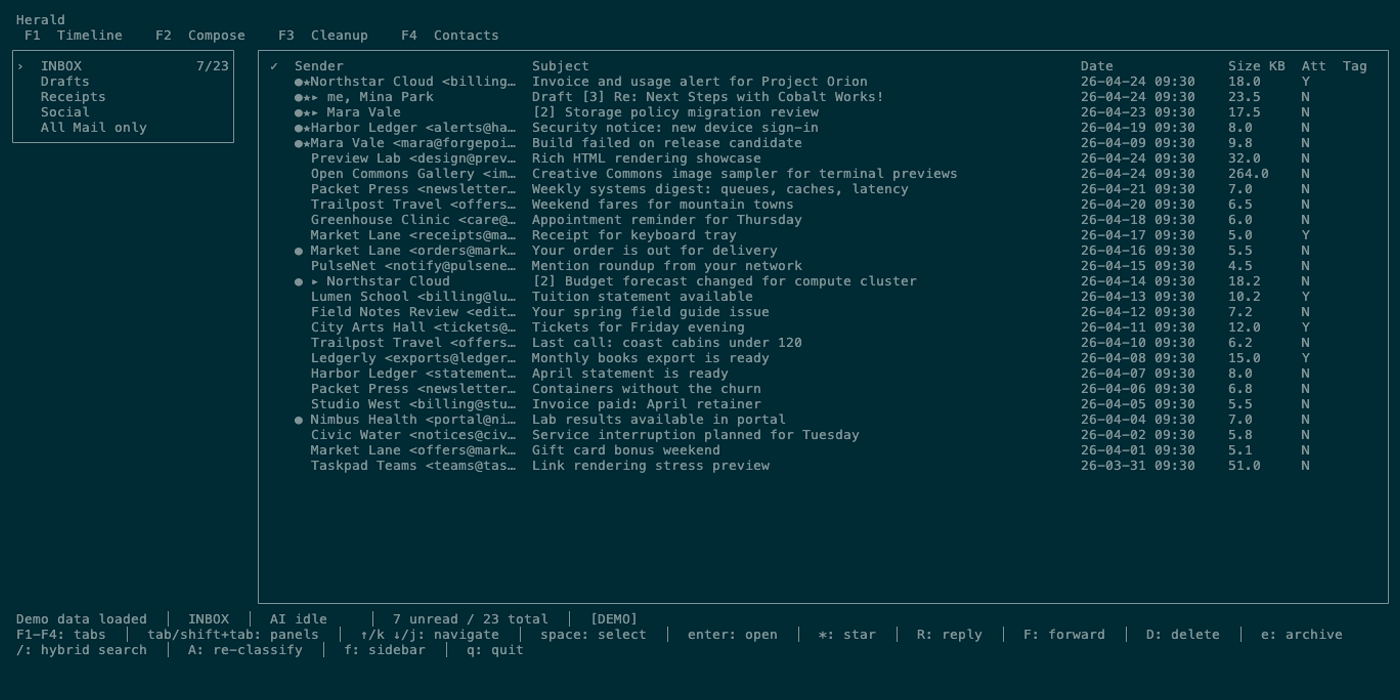
Calendar demo path
Section titled “Calendar demo path”Use Calendar in demo mode when you want to try the schedule workspace without connecting a real calendar:
- Run
./bin/herald --demo. - Press or click
3 Calendar. - Try
wWeek,dDay,t3-Day,aAgenda,/Search, andenterEvent Detail. - Create, edit, and delete demo events where the selected demo calendar is writable.
- Return to Timeline, open the demo invitation email, and press
ifrom the preview to import the.icsinvitation into a demo calendar.
Calendar mouse actions also work in demo mode: click mini-month days, click events, double-click the selected event for detail, click rail swatches or checkboxes, scroll calendar lists, and press m when you want terminal-native text selection.
Image rendering demo
Section titled “Image rendering demo”Demo mode includes a Step 5: View inline images in full screen Herald Image Lab email with embedded Creative Commons inline images. To test raster image rendering, run Herald in a Kitty-protocol terminal such as Ghostty on macOS or Kitty itself and force the Kitty graphics path:
./bin/herald --demo -image-protocol=kittySearch for Step 5: View inline images in full screen, open the image message, and press z for full-screen preview. iTerm2 can use -image-protocol=iterm2; terminals without raster graphics show safe placeholders or local open image links when available.
Browser demo
Section titled “Browser demo”You can combine demo mode with ttyd:
ttyd -W ./bin/herald --demoRegenerate demo GIFs
Section titled “Regenerate demo GIFs”Demo tapes live in demos/*.tape, canonical GIFs go to assets/demo/*.gif, and docs-facing copies go to docs/public/demo/*.gif. Broad docs captures use the brighter Builtin Solarized Dark VHS theme; selected showcase captures also use Dark Pastel, Red Alert, and Builtin Pastel Dark.
brew install vhs ffmpegmake docs-mediaRun media generation from the repository root because the tapes reference ./bin/herald.
Theme gallery screenshots use a separate tmux flow:
scripts/regenerate-theme-screenshots.shHERALD_THEME_SCREENSHOT_VIEW=preview scripts/regenerate-theme-screenshots.sh jade-signalSee Regenerate Screenshots and Demo GIF Workflow for the full recording flow.
What demo mode is not
Section titled “What demo mode is not”Demo mode is not a local mailbox emulator. It is a presentation and UI testing mode with synthetic data. Use a real IMAP account or a test IMAP server when you need to verify provider behavior.
For development regression tests, Herald also has an internal virtual mail lab in internal/testmail. That lab starts local IMAP/SMTP servers, routes mail between alice@herald.test and bob@herald.test, and can replay sanitized realistic fixtures from internal/testmail/testdata/corpus. Use demo mode for polished demos and broad UI smoke checks; use the virtual lab for realistic MIME, calendar invite, inline image, draft, reply, and send-flow regressions; use live config only for provider-specific behavior.