First-run Wizard
The first-run wizard appears when Herald cannot find a usable config at the default path or at the path passed with -config. It connects a mail account first, applies safe defaults, and lets people customize optional preferences only when they choose to.
Overview
Section titled “Overview”Use the wizard to choose an account type first, then move through a compact provider-specific setup. Gmail OAuth can include Gmail and optional Google Calendar from one OAuth grant; Gmail App Password, Proton Mail Bridge, Fastmail, iCloud, Outlook, and Standard IMAP remain available from the same account chooser.
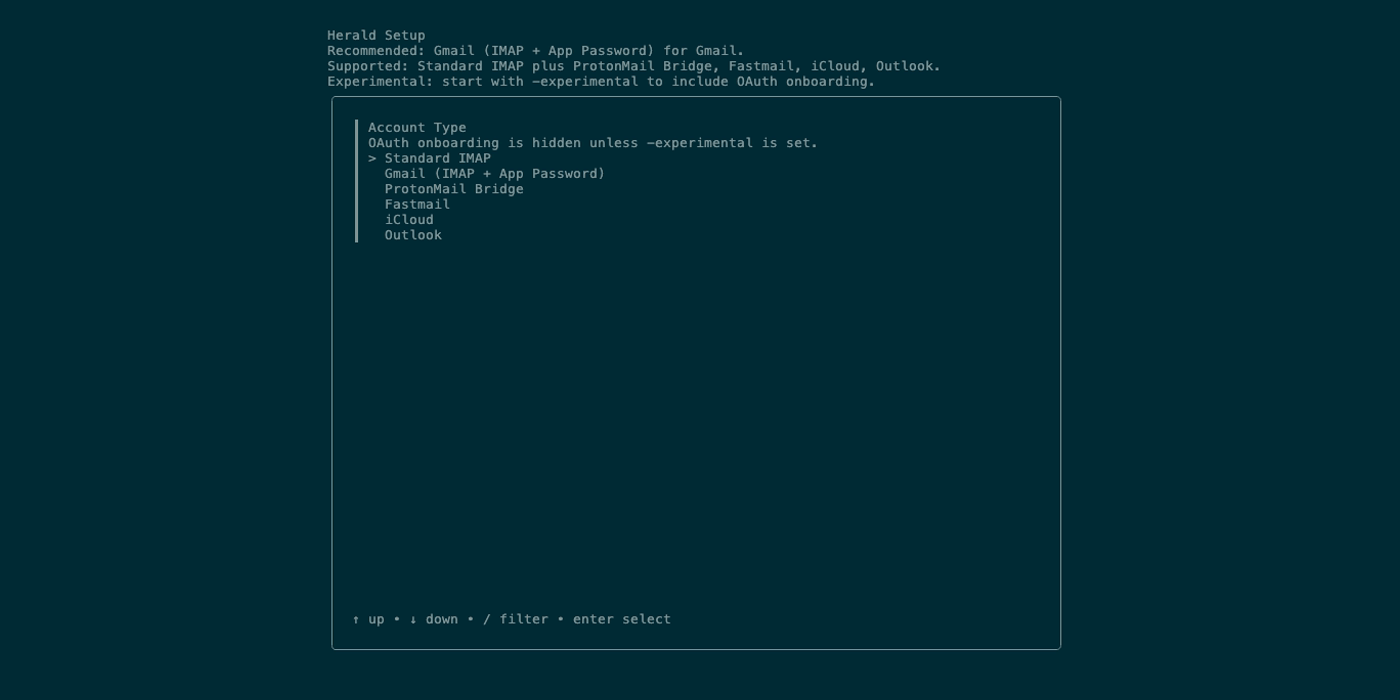
Screen Anatomy
Section titled “Screen Anatomy”The wizard replaces the normal tabbed interface until it completes or is cancelled.
| Area | What it shows |
|---|---|
| Account Type | Gmail OAuth, Standard IMAP, Gmail App Password, Proton Mail Bridge, Fastmail, iCloud, and Outlook. |
| Google account | The Gmail OAuth provider step, with Mail enabled, Google Calendar enabled by default, and optional identity before Herald verifies Google access. |
| Provider details | Gmail App Password, Proton Mail Bridge, Fastmail, iCloud, Outlook, and Standard IMAP fields. Presets fill host and port values but do not invent credentials. |
| Identity fields | Email address, username, and password or app password, depending on the selected provider. |
| Server fields | IMAP host and port, SMTP host and port, and optional advanced overrides. |
| Account connection | Verifies required provider access after account details, before writing the config. |
| Advanced settings | Shows default Theme, AI, Keyboard, Offline Cache, and Signature choices in one screen, then lets users enter Herald or customize. |
Controls
Section titled “Controls”| Control | Preconditions | Result |
|---|---|---|
tab / form navigation | A wizard field is active. | Moves to the next field according to the form component. |
enter | Current field is valid or a choice is highlighted. | Accepts the value or advances the wizard. |
esc | Wizard is active. | Cancels setup; in first-run mode this exits the setup path instead of opening a half-configured mailbox. |
ctrl+c | Any wizard state. | Quits Herald. |
Workflows
Section titled “Workflows”- Install Herald with Homebrew or build it from source.
- Run
herald, or use./bin/heraldfrom a source checkout. Pass an explicit path withherald -config ~/.herald/conf.yamlwhen needed. - Choose an account type.
- For Google, leave Mail enabled, decide whether to keep Google Calendar enabled, and complete browser authorization. For app-password or IMAP providers, enter the provider credentials.
- Herald verifies access before saving. If the check fails, the config file is not written and the wizard returns you to account setup.
- Review the compact Advanced settings screen, then choose
Enter Heraldto launch with defaults orCustomize setupto change AI, cache, keyboard, theme, and signature in detail. - After save, Herald writes the validated config, creates or opens the SQLite cache, processes new mail, and opens the Timeline tab.
Offline Cache Policy
Section titled “Offline Cache Policy”The Sync and cleanup step asks how much fetched preview data Herald should keep. New configs default to Message bodies without attachments, which lets background preview loading support offline reading without keeping downloadable attachment bytes. Lightweight previews keeps preview text, headers, and attachment metadata only. Full offline archive keeps fetched preview data including attachment bytes, using more disk and keeping more mail data locally.
Provider Choices
Section titled “Provider Choices”| Choice | Use when | Notes |
|---|---|---|
| Gmail OAuth / Google account | You want browser-based Google authorization for Gmail, with optional Google Calendar. | Recommended default; stores refresh token data only after selected Google access verifies successfully. |
| Gmail IMAP + App Password | You use personal Gmail with 2-Step Verification and an app password. | Fallback Gmail path when OAuth is unavailable for your account. |
| Proton Mail Bridge | You run Proton Mail Bridge locally. | Uses Bridge host, ports, username, and password. |
| Fastmail, iCloud, Outlook | You want preset host/port values. | IMAP presets; provider app passwords may still be required. |
| Standard IMAP | You know your IMAP and SMTP host and port. | Most portable non-preset path. |
Data And Privacy
Section titled “Data And Privacy”The wizard keeps credentials, app passwords, OAuth refresh tokens, host names, and ports in memory until account validation passes, then writes them to the selected YAML file only when you enter Herald or save customized preferences. Treat that file as a credential store and use chmod 600 on Unix-like systems.
If you configure Ollama, AI requests stay local to the Ollama host. If you configure Claude or an OpenAI-compatible provider, later AI features may send selected email context to that provider when you invoke them.
Troubleshooting
Section titled “Troubleshooting”If the wizard reappears every time, verify that Herald is reading the config path you expect and that the file was saved successfully.
If verification fails, read which check failed, press Enter to return to the populated setup screen, check what you typed, and try again. Credential-based mail failures usually mean the host, port, username, password, app password, or provider mail setting is wrong. Google OAuth failures usually mean the grant was canceled, expired, or missing the selected Mail or Calendar access.
If you choose Cancel on the Google consent screen, Herald reports that authorization was cancelled and does not save settings. See Settings for the OAuth wait overlay behavior.
If OAuth fails immediately with Google OAuth credentials are not configured, you are probably using a source-built development binary without build-time or runtime OAuth credentials. Homebrew and release binaries include OAuth defaults. For source builds, export HERALD_GOOGLE_CLIENT_ID and HERALD_GOOGLE_CLIENT_SECRET before launching herald, or place both values in .herald-dev.env before running make build. Release-style local builds use .herald-release.env with make build-release-local and fail early if either value is missing. See Local OAuth Builds for the full source-build contract.