Herald Memories
Herald Memories turns important email history into local, source-backed context for replies, contacts, companies, threads, chat, and Obsidian-friendly Markdown notes. It is designed for work threads, job search, recruiting, consulting, founder/customer conversations, and other relationships where continuity matters.
Overview
Section titled “Overview”Memories are stored as immutable local records under ~/.herald/memories by default. Herald can refresh them from cached Inbox and Sent mail, then use the results in Compose Radar, Contacts dossiers, email-preview thread dossiers, chat tools, Obsidian sync previews, and daily briefing diffs.
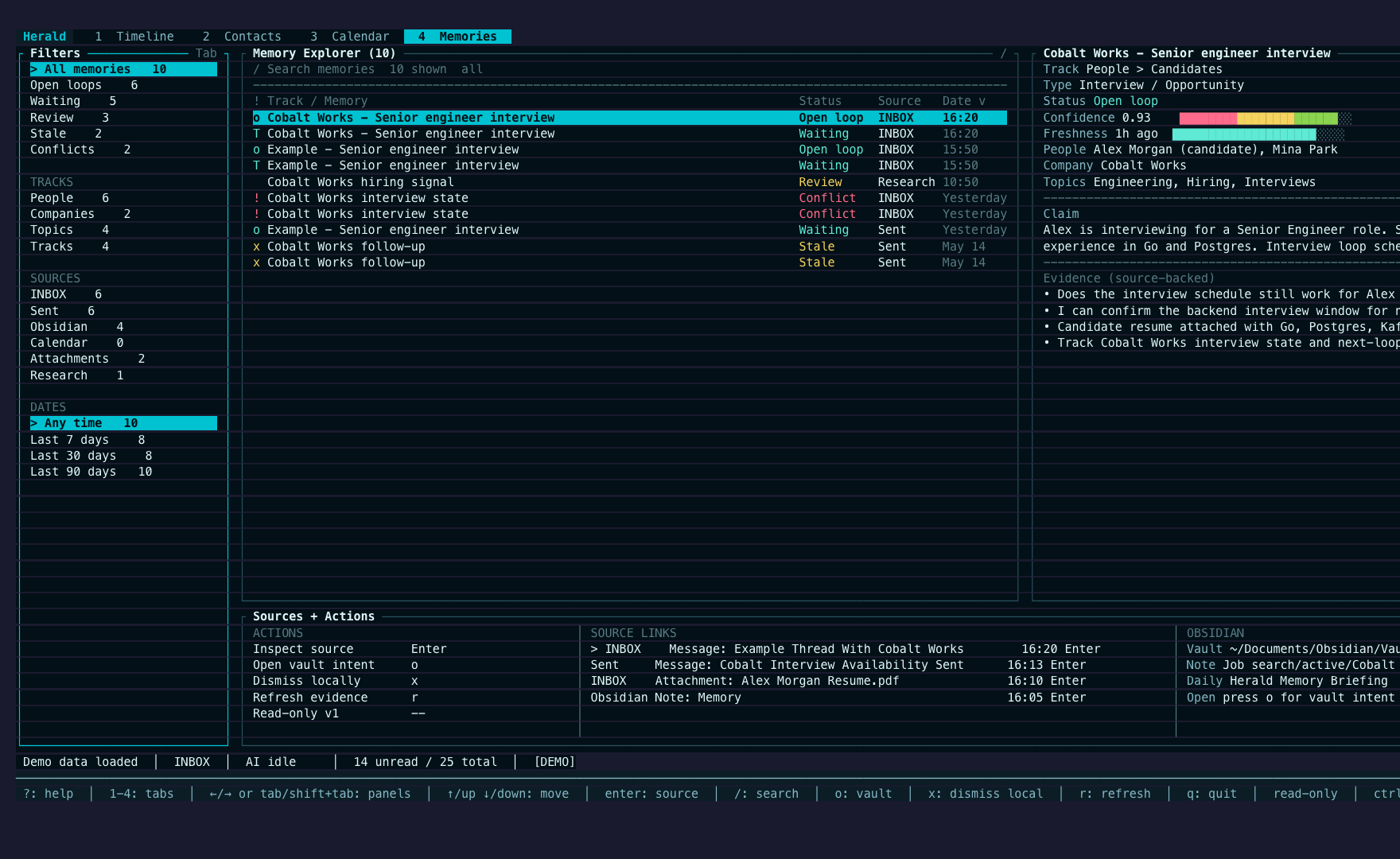
Demo mode includes synthetic memory examples for Sergey, Mina, and Cobalt Works, so screenshots and docs can show the feature without private mailbox data.
Screen Anatomy
Section titled “Screen Anatomy”| Area | What it shows |
|---|---|
4 Memories workspace | Searchable read-only memory workbench with lifecycle filters, track rows, detail dossier, source evidence, and Obsidian links. |
| Compose Radar | Up to three source-backed reply nudges when a reply draft has strong relevant memory. |
| Contact dossier | Relationship summary, recent interactions, active tracks, open loops, vault links, and compact evidence labels. |
| Company dossier | Company or domain-backed tracks, job-search vault path, open loop, and evidence. |
| Thread dossier | Email-preview context for the selected subject, including active track, open loop, canonical note link, and source evidence. |
| Settings > Memories | Setup fields, allowed memory tasks, vault path, included sources, prompt template inventory, confidence thresholds, update rules, Obsidian profile, and store counts. |
| Obsidian preview | Generated-section Markdown changes shown before first write or section rewrite. |
| Daily briefing diff | Changed tracks, newly resolved loops, stale loops, failed syncs, review-needed memories, and vault hygiene items. |

Controls
Section titled “Controls”| Control | Context | Result |
|---|---|---|
4 / Alt+4 / F5 | Main TUI | Open the Memories workspace. |
/ | Memories workspace | Search memory claims, summaries, topics, people, companies, and source snippets. |
← / → or Tab / Shift+Tab | Memories workspace | Move focus between filters, memory list, detail, and source panes. |
Enter | Memories source pane | Inspect the selected source pointer in place when available. |
o | Memories detail or source pane | Show the selected Obsidian/vault target when one exists. |
Settings > Memories | Main settings overlay | Configure enablement, local directory, sources, allowed memory tasks, extraction trigger, vault targets, confidence thresholds, prompt-template inventory, and Obsidian output profile. |
| Compose Radar actions | Reply Compose when nudges exist | Open source, insert a bounded phrase, dismiss, mark resolved, save for review, or record research intent. |
| Contact detail | Contacts tab | Shows person and company dossiers when matching memories exist. |
| Email preview | Timeline preview | Shows a thread dossier when the selected subject has matching memories. |
| Research actions | Compose Radar or dossier workflows | Plan explicit person/company research using public identifiers only by default. |
Workflows
Section titled “Workflows”Reply With Compose Radar
Section titled “Reply With Compose Radar”- Open a memory-backed Timeline email.
- Press
Rto reply. - Review any Compose Radar nudges.
- Open a source or insert a bounded phrase only when useful.
- Finish and send normally.
Compose Radar does not silently mutate drafts. It stays hidden or quiet when there is no high-confidence source-backed memory.
Explore Memories
Section titled “Explore Memories”- Press
4to open the Memories workspace. - Use the filter rail for
All,Open loops,Waiting,Review,Stale,Conflicts, source types, and date ranges. - Press
/to search memories, thenEnterto keep the result set. - Move through the list and source panes to inspect claims, track status, evidence, and Obsidian targets.
The Memories workspace is read-only in this release. It does not forget, pin, correct, resolve, write Obsidian notes, run external research, mutate mail, or mutate calendar events.
Review A Contact Or Company
Section titled “Review A Contact Or Company”- Press
2for Contacts. - Open a contact with
enter. - Read the Herald Memories section for relationship summary, active track, open loop, vault link, and evidence.
- Use recent email preview for the underlying message context.
Sync To Obsidian-Friendly Markdown
Section titled “Sync To Obsidian-Friendly Markdown”- Open
Settings > Memories. - Configure the vault path and, in advanced Obsidian output settings, destinations such as
People/,Job search/,Scheduled Task Artifacts/, andMemory Inbox/. - Choose frontmatter, YAML header, link, and tag modes.
- Generate a preview.
- Apply only after reviewing the generated sections.
Herald preserves user-authored content outside its stable generated-section markers.
Use Research Mode
Section titled “Use Research Mode”- Choose a research action for a person, company, dossier refresh, or reply.
- Review the public-identifier query plan.
- Opt in to external research before anything leaves the machine.
- Save sourced research notes with URL, retrieval date, confidence, and what changed since last contact.
Private email bodies, private note text, attachments, and full thread summaries are not sent to external research by default.
States
Section titled “States”| State | What happens |
|---|---|
| Memory unavailable | Compose and chat keep working; Herald shows a bounded empty or unavailable state. |
| Low confidence | Memories remain searchable or reviewable but do not become Compose Radar warnings. |
| Source missing | Deleted, archived, moved, or cleaned-up source mail marks dependent memories stale/source-missing and blocks high-confidence nudges. |
| Dismissed nudge | The dismissal scope is remembered, and the nudge does not reappear unless new evidence materially changes the situation. |
| Corrected memory | User correction overrides the generated text in effective views while immutable history and evidence remain inspectable. |
| Forgotten memory | Retrieval hides the memory without deleting the immutable record from disk. |
| AI scheduler busy | Memory extraction uses the managed AI scheduler; reply-prep refresh is interactive and search-triggered refresh is background. |
Data And Privacy
Section titled “Data And Privacy”Memory files are local by default at ~/.herald/memories. Records store compact claims, source evidence pointers, bounded snippets, confidence, freshness, prompt version, and optional Obsidian target metadata. They are not a second raw-mail archive.
Optional calendar, Obsidian, and research-note sources are off by default. When enabled, calendar ingestion reads cached calendar events, Obsidian ingestion reads Markdown only under configured destination folders, and research-note ingestion reads saved Markdown notes that contain explicit source URLs.
Obsidian sync writes only after preview approval and only to configured vault targets. Research Mode is explicit and uses public identifiers by default. MCP and daemon servers do not expose a memory API in the current UI-first release.
Troubleshooting
Section titled “Troubleshooting”If no nudges appear, the draft may not have high-confidence matching memories, the source may be missing, or the relevant cache has not refreshed yet.
If Obsidian output is noisy, lower tag generation, choose no visible YAML headers, switch link mode, or raise the Obsidian write threshold in Settings > Memories.
If research is blocked, enable Research Mode and external opt-in, then retry with a public identifier such as a person name, company, domain, role, or URL.